Wander Weather
- 4.3
- Rating
- 1.00M
- Installs
- Free
- Price
 Analysis by App-foxy
Planning a day out often involves an annoying loop: check the forecast, open a map, think about the destination, check the forecast again, and then repeat the whole process when the timing changes. Wander Weather is built around making that decision easier. It is a free weather app from Leapora Tech that focuses on helping me think about trips and outdoor plans in relation to the weather, rather than treating the forecast as an isolated number on a screen.
That distinction matters. A standard weather app is usually excellent when I want to know whether it will rain at home. It is less convenient when I am comparing a picnic location, a day trip, or a walk several miles away. In my experience, the appeal here is not that it replaces every weather tool, but that it gives travel planning a more direct purpose. Instead of asking only “What is the weather now?”, I can approach the question as “Is this a sensible time to go there?”
I reviewed it as a practical utility rather than as a feature-heavy weather dashboard. The app is rated at 4.6 from around 435 ratings, and it has passed 100K installs. Those figures suggest that it has found an audience among people who want a straightforward planning aid. It is also rated for Everyone, so it is suitable for general household use rather than being aimed at a specialist or adult audience.
You May Also Like

 Blood Strike: 2.5 Anniversary
Blood Strike’s Loadouts Turn Every Drop Into a Tactical Gamble
A close look at Blood Strike’s custom loadouts: how fast access to signature weapons reshapes its battle royale rhythm, rewards preparation, and narrows the gap between fights.

 Pandora - Music & Podcasts
Pandora’s Music Is Easy to Start, but Harder to Recover
Pandora’s strength is its low-effort path from a seed to a station. Its weak spot is how much confidence it asks you to place in connection, setup, and quiet recovery.

 8 Ball Pool
 Is Built on Rivalries, Rematches, and Routine
A close look at the rivalries, rematches, shared routines, and unanswered safety questions that turn a quick pool match into a persistent mobile community.

 Samsung Music
’s Quiet Strength Is Playing What You Already Own
Its reach comes less from spectacle than from dependable access to a personal library. That simplicity is both the app’s strongest retention engine and its ceiling.

 AccuWeather: Weather Radar
AccuWeather Review: A Quick, Clear Forecast for Everyday Decisions
For everyday plans, the best forecast is the one you can understand quickly. AccuWeather makes rain timing, radar, and local conditions easy to act on, with a few trade-offs.

 Hill Climb Racing
Why Hill Climb Racing Still Turns Crashes Into One More Run
A tiny car, a bumpy hill and one more upgrade: Hill Climb Racing keeps resurfacing because its simple chaos makes every near-miss feel personal.
More From Our News Desk
View All News


Making weather checks useful for actual plans
I find the most useful way to judge a trip-focused forecast is to connect it to the decision I still have time to change. Rather than checking only whether conditions look pleasant, I consider what I would do if they do not: shift the start, choose another destination, or keep the outing shorter. That practical mindset sets up the next section’s focus on making each weather check count.
The recurring problem is not finding a forecast
Weather information is easy to find. The real problem is turning it into a decision. Forecast apps often present current conditions, hourly rows, daily cards, maps, alerts, and extra details. That can be useful, but it can also make a simple question feel like a small research project. When I am deciding whether to leave early, postpone a visit, or pack an extra layer, I do not necessarily need every available weather metric.
Wander Weather makes sense for that moment before a trip. Its store summary describes the purpose as planning trips smartly according to the weather, and that is the most useful way to understand the app. I would not open it expecting a replacement for a full meteorological workstation. I would open it when the weather is one of the factors deciding whether an outing is worth the effort.
A useful example is a weekend walk. The destination may be dry in the morning but unpleasant later, while the starting point still looks fine. A normal forecast app can show both places, but I may need to search for the destination separately and mentally compare the results. A trip-focused weather tool is valuable because it encourages me to check the location I am actually going to, not just the place where I happen to be standing.
My first useful setup
The first check I would make after installing it is whether the app fits the way I already plan. I would choose a realistic destination rather than testing only my current location: a nearby park, a relative’s town, a regular commute, or the place I am considering visiting next. That immediately reveals whether the app helps with decisions that matter to me.
Wander Weather is currently at version 1.1.1 and works on devices running Android 6.0 or later. That broad compatibility is helpful for people keeping an older phone in service, although the experience will naturally depend on the device itself. I would also recommend checking a destination before leaving home, when I have time to compare options, instead of waiting until I am already on the road and trying to make a rushed decision.
The app is free, which removes the most common barrier to trying a planning tool. I can install it, test it against my usual routine, and decide whether it saves enough time to keep using it. For a weather app, that low commitment is important because usefulness depends heavily on personal habits: someone who rarely travels may not gain much, while someone who regularly chooses between outdoor plans can benefit immediately.
One practical habit is to use the forecast as a planning window rather than a guarantee. If I am arranging a walk, I would look for a comfortable period and keep a backup option in mind. That is a better workflow than treating one forecast icon as permission to ignore changing conditions. The app can support the decision, but it cannot remove the uncertainty built into weather itself.
Where it helps during an ordinary week
Imagine I have planned a visit to an outdoor market after work. At lunchtime, the weather at home looks acceptable, but the market is in another part of town and I will be outside for most of the evening. I can use Wander Weather to check the destination, decide whether to leave earlier, and choose clothing based on the conditions there. If the outlook looks uncomfortable, I can switch to an indoor alternative before spending time travelling.
That is a small saving, but repeated small savings are where this kind of app earns its place. I spend less time jumping between a weather screen and a map, and I make the decision while there is still time to change it. The benefit is especially clear for plans that are inconvenient to cancel: a long walk, a family outing, a scenic drive, or a visit to a place with limited shelter.
It can also help with flexible travel. If I have two possible destinations, I would check both rather than automatically choosing the closer one. The better choice may be the location with a more comfortable forecast, even if the distance is similar. This is one of the more useful ways to think about the app: not as a source of weather trivia, but as a quick comparison step before committing to a plan.
For commuting, the value is more modest. If I travel the same route every day, I may already know the local forecast and have a routine for dealing with rain or cold. In that case, a conventional weather widget may be faster. Wander Weather becomes more interesting when the destination changes, the trip is optional, or the weather can significantly affect what I will do once I arrive.
Small workflow improvements that make a difference
My first tip is to check the destination at the time I expect to be there, not merely the conditions at the time I am checking the app. A forecast can look fine now while the useful travel window is less comfortable later. Thinking in terms of the outing’s schedule prevents a common mistake: confusing current weather with trip weather.
My second tip is to use the app before making the final commitment. If I wait until everyone is ready to leave, a poor forecast creates unnecessary frustration. Checking earlier gives me room to move the start time, shorten the visit, or change the destination. This is where the app can remove friction even when the forecast itself is not perfect.
My third tip is to pair the weather decision with the nature of the destination. A light shower may be manageable for a café visit but a serious problem for an exposed viewpoint. Similarly, a cool temperature may be comfortable for a brisk walk and unpleasant for standing still at an event. The app can tell me about conditions, but I still need to interpret them in the context of the activity.
That last point is also a limitation. A weather application cannot know whether I have access to shelter, whether a trail becomes muddy, or whether a child in the group will tolerate a cold afternoon. I appreciate tools that help me make a decision, but I would not confuse convenience with personal judgement.
What it removes compared with usual alternatives
The usual alternative is a general weather app combined with a map or travel app. That combination can be more powerful, especially when I need navigation, traffic information, radar, or detailed local observations. The downside is the extra switching. I have to search for the destination in one place, inspect the forecast in another, and remember the details while deciding.
Wander Weather’s advantage is the narrower job. A focused app can feel calmer because I am not being asked to process unrelated information before answering a simple travel question. For a casual day trip, that focus may be more valuable than a long list of advanced weather layers.
On the other hand, people who need severe-weather monitoring, professional forecasting detail, or extensive map-based analysis may prefer an established full-featured weather service. I would also choose a standard weather app if I mainly care about a home-screen glance at current conditions. The right choice depends on whether the problem is general weather awareness or destination planning.
Another trade-off is that a focused experience may encourage me to overlook details I would normally inspect elsewhere. Before a long journey, I would still cross-check important conditions using a trusted source, particularly when the weather could affect safety. For an ordinary outing, the streamlined approach is convenient; for a demanding trip, I would want more context than a single planning tool may provide.
Who will get the most from it
I think the best audience is people who regularly make weather-dependent choices: walkers, casual travellers, families arranging outdoor time, visitors choosing between destinations, and anyone who dislikes discovering bad conditions only after arriving. It is also a sensible option for someone who finds large weather apps overwhelming and wants a more direct route from forecast to decision.
The app is less compelling for users who never travel beyond their immediate area, already have a reliable weather widget, or want detailed meteorological analysis. If my routine is simply checking whether I need an umbrella before leaving home, the extra trip-planning focus may not change much. Likewise, if I need navigation and weather in one comprehensive travel system, I may prefer an alternative that combines both functions more deeply.
Because it is free and suitable for Everyone, there is little practical risk in testing it with a genuine upcoming plan. I would judge it after a few real decisions rather than after a quick glance at the interface. The important question is not whether it displays weather attractively; it is whether I spend less time comparing information and make better-timed choices.
Reliability, expectations, and everyday judgement
Weather forecasts are inherently changeable, so I would treat Wander Weather as a planning aid rather than a promise. If a trip is important, I would check close to departure as well as earlier in the planning process. That two-stage habit gives me both flexibility and a final reality check.
I would also avoid using a convenient forecast to justify ignoring warnings or obvious changes in conditions. A short outdoor plan can be moved; a risky journey should be reconsidered more carefully. The app is most useful when it helps me notice a problem early, not when I use it to force a plan to happen.
One strength of this approach is that it supports practical compromises. I might shorten a walk, leave before the worst part of the forecast, choose a destination with indoor options, or postpone the trip. Those are more useful outcomes than simply seeing a weather symbol and continuing without thinking. The app earns its value when it changes my planning behaviour in a sensible way.
My verdict after using it as a planning tool
Wander Weather is a focused weather app for people who want to connect forecasts with real trips. Developed by Leapora Tech, it does not need to be the most elaborate weather product to be useful. Its strongest idea is simple: check the conditions where I am going, at the time I expect to be there, before I spend effort getting there.
I like it most for flexible outings and destination comparisons, where a few seconds of preparation can prevent a wasted journey. The free price makes experimentation easy, and the Everyone rating keeps it accessible for general use. Its current version, 1.1.1, also makes clear that I should judge it as a focused utility rather than assume it offers every mature feature found in larger weather platforms.
My recommendation is therefore specific. If weather frequently affects your day trips, outdoor plans, or travel choices, this app is worth trying because it may remove the repetitive checking that normally happens before you leave. If you only need a quick local forecast, or if you require advanced warnings, navigation, and deep meteorological detail, a conventional alternative may serve you better.
For me, the deciding benefit is time saved before a plan becomes inconvenient to change. Wander Weather is at its best when it turns a vague question—“Should I go?”—into a more useful decision about where, when, and how to go.
FAQs for Wander Weather
01What platforms is Wander Weather available on?
Wander Weather is available for both Android and iOS devices. You can download it from the Google Play Store for Android users and the Apple App Store for iOS users. The app is designed to provide a seamless experience across all devices, ensuring you have access to the latest weather updates wherever you are.
02Does Wander Weather offer real-time weather updates?
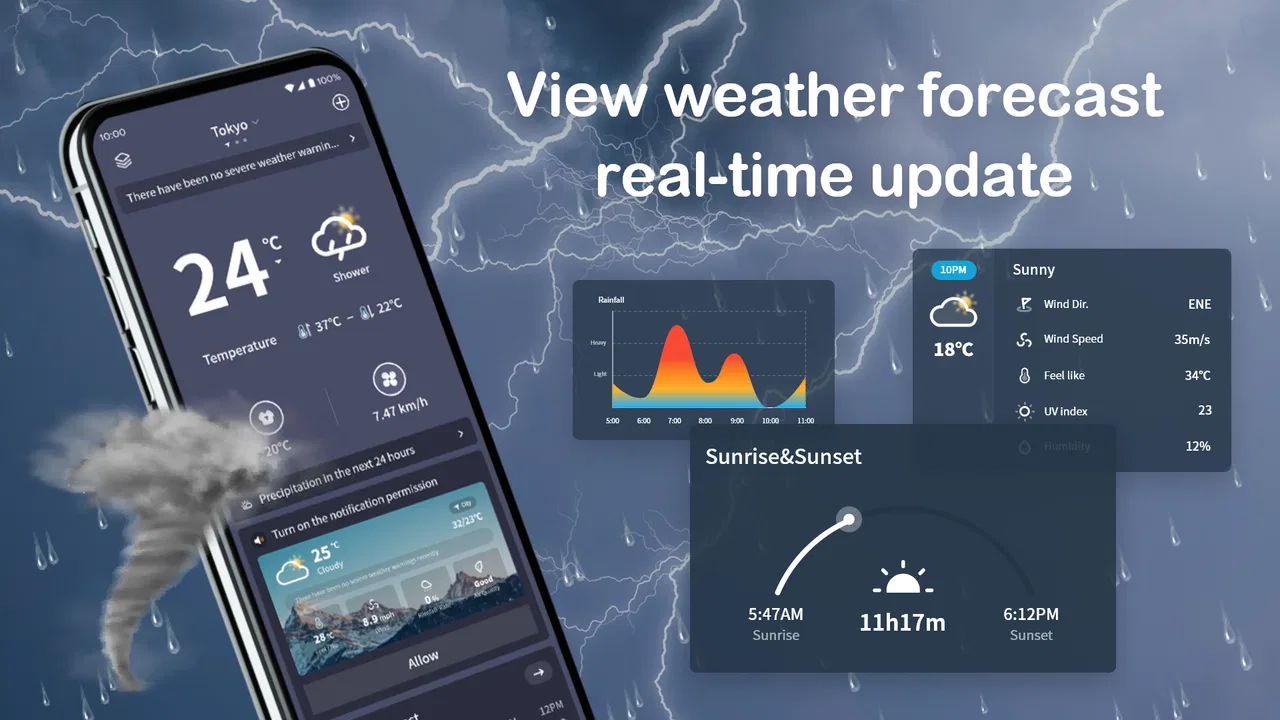
Yes, Wander Weather provides real-time weather updates to keep you informed about current conditions. The app uses advanced algorithms and data from reliable sources to ensure accuracy. You'll receive timely notifications about changes in weather, including temperature, precipitation, and wind conditions, so you can plan your day accordingly.
03Can I customize the notifications in Wander Weather?
Absolutely! Wander Weather allows you to customize notifications based on your preferences. You can choose to receive alerts for severe weather conditions, daily forecasts, or specific weather events like rain or snow. The app's settings are user-friendly, making it easy to tailor notifications to suit your needs and lifestyle.
04Is there a cost to download or use Wander Weather?
Wander Weather is free to download and offers a range of features at no cost. However, there are optional in-app purchases available, such as premium features and ad-free experiences. These purchases enhance your experience but are not necessary for accessing the app's core functionalities.
05How user-friendly is the interface of Wander Weather?
Wander Weather boasts a highly intuitive and user-friendly interface. The design is clean and modern, enabling users of all ages to navigate effortlessly. Key features are easily accessible, and the app provides clear, concise information, making it simple to find the weather details you need quickly.
Pros
- Accurate real-time weather updates.
- User-friendly interface design.
- Customizable notifications.
- Detailed forecasts available.
- Supports multiple locations.
Cons
- Occasional app crashes reported.
- Ads can be intrusive.
- Limited free features.
- Slow loading times on startup.
- Requires a stable internet connection.

Wander Weather
Gallery